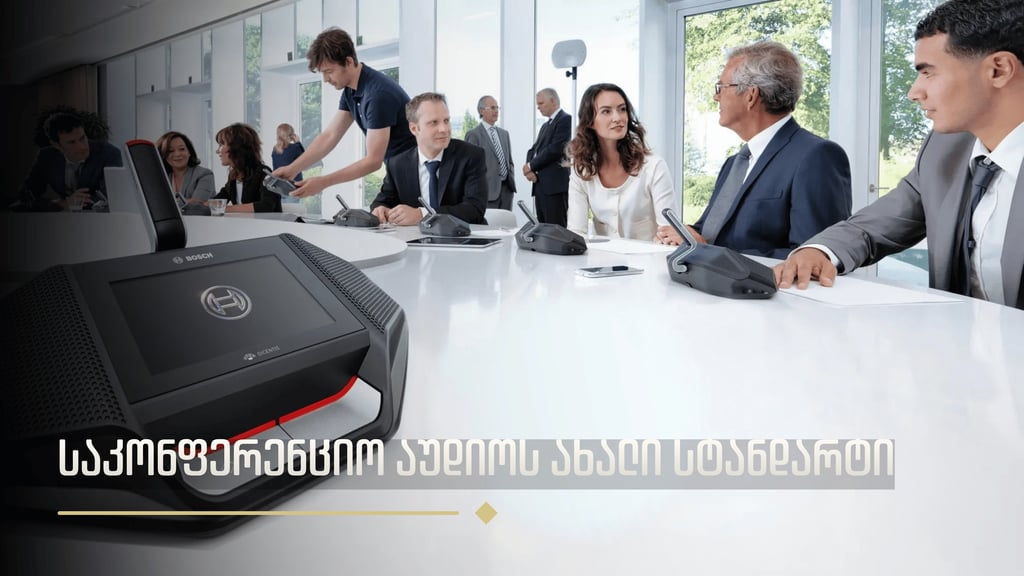
In a conference space, good audio means more than just clear sound. In modern meetings, it is also important that the camera automatically captures the active speaker while they are talking, correctly displays their image on the screen, and conveys the flow of the meeting to participants as naturally and comfortably as possible.
The combination of Bosch conference systems and AVer professional PTZ cameras is one example of this: the microphone determines who is speaking, and the camera automatically moves to the corresponding position.
Why is a conference microphone important?
In a conference hall, the primary task of a microphone is not just sound amplification. It is important that each participant's voice is perceived clearly and evenly, that the microphone is correctly positioned, and that the system can identify the active speaker.
Bosch conference systems use microphone solutions created specifically for meetings, including "Gooseneck" type microphones that are placed directly in front of the participant.
The long, flexible construction of the "Gooseneck" microphone allows the microphone capsule to be placed in an optimal position. As a result, the voice of the conversation reaches the microphone directly, and the participant does not need to constantly lean toward the microphone.
In the case of the Bosch CCS 1000 D system, the microphone and speaker work in such a way that the conversation process is perceived more naturally. The system also has a digital acoustic feedback reduction function, which facilitates clear communication.
What is a "Gooseneck" microphone?
"Gooseneck" microphones get their name due to their flexible, long tubular construction. These types of microphones are especially common in:
Conference halls; Meeting rooms; City councils and courtrooms; Educational spaces and universities; Hotel conference spaces; Business meeting and presentation rooms. Its main advantage is precisely the simplicity of positioning. The microphone can be placed in front of a specific participant and optimally directed toward the source of the conversation.
In the Bosch CCS 1000 D system, there are various types of Discussion Devices, including options equipped with long microphones.
Audio Tracking
One of the important functions of a modern conference space is audio tracking. Imagine a meeting where 10 or 20 people are sitting at a table. One of the participants activates their microphone and starts talking. In a traditional system, the operator might need to control the camera manually. In an integrated system, however, the process is automated:
Participant starts talking → relevant microphone activates → system detects the active speaker → camera moves to a predefined position → the corresponding participant appears on the screen.
This is one of the main purposes of camera tracking - using the audio signal to control the camera.
The Bosch DICENTIS system has an automatic camera control function and supports integration with compatible IP cameras. The system can direct the camera to a predefined position based on the active speaker.
How does the Bosch + AVer integration work?
By combining a Bosch conference system and an AVer PTZ camera, it is possible to make the audio and video parts of the meeting work as a single unit.
AVer's PTZ Link software is specifically designed to connect AVer professional PTZ cameras with microphone systems and ensure the camera's audio tracking function through predefined Preset positions.
Bosch CCS 1000 D and DICENTIS systems are included in AVer-supported integrations. AVer's official solution describes connecting to these Bosch systems via RESTful API, which allows camera control and automatic tracking to be combined into a single system.
In practice, this means that each conference seat can have a corresponding camera Preset.
For example:
Participant 1 → Preset 1
Participant 2 → Preset 2
Participant 3 → Preset 3
When a specific participant activates the microphone, the system selects the corresponding camera position.
Why is this important for hybrid and online meetings?
If meeting participants are all in one room, automatic camera tracking is very comfortable, but in the case of hybrid meetings, its importance increases even more.
When in-room participants and remote participants are in one meeting, the online participant must be able to see not just the whole room, but the person who is speaking at that moment.
Therefore, in a modern conference system, synchronization of two parts is important:
Audio: Who is speaking?
Video: Where are they and how should they appear on the screen?
AVer professional cameras are designed for use where audio tracking and automatic detection of the active speaker are required. The specific camera capabilities depend on the chosen model and system configuration.
What does a PTZ camera mean?
PTZ stands for Pan-Tilt-Zoom: the three basic directions of camera movement.
Pan - horizontal movement of the camera;
Tilt - vertical movement of the camera;
Zoom - bringing the image closer or moving it further away.
It is the combination of these capabilities that allows the camera to move from one predefined position to another and capture the necessary participant in the frame.
AVer professional PTZ cameras offer various options for optical zoom, video output, and control interfaces, which allow the camera to be adapted to the requirements of a specific space.
Presets are one of the most important parts of the system
During camera tracking, predefined Preset positions play an important role. For example, if there are 8 participants at a conference table, a corresponding camera position can be created for each seat. The system "knows" these positions in advance and switches the camera to the appropriate view at the required moment.
This is especially important when several cameras are used in a large or complex conference space. Bosch systems also allow working with pre-configured positions when using automatic camera control.
One camera is not always enough
In a small meeting room, one PTZ camera may be completely sufficient; however, in a large conference hall, auditorium, or multi-faceted meeting space, it may become necessary to use several cameras.
In this case, the system must not only reach a specific participant but also determine which camera provides the best view of them. The camera control capabilities of the Bosch CCS 1000 D system also allow for the use of several cameras and a video switcher. In more complex AVer solutions, it is also possible to use automatic camera switching and video control based on the active speaker.
Why is integration important?
A microphone by itself provides good sound.
A camera by itself provides good imaging.
But in a modern conference space, their real capabilities are shown when these systems are correctly integrated with each other.
In such a case, the user no longer needs to manually control the camera during the meeting. The technology works in the background and attention remains entirely on the meeting.
A correctly planned system can combine:
Bosch conference microphones and Discussion System; AVer PTZ cameras; Camera Preset positions; Audio tracking; Automatic video switching; A screen or projector; A video conferencing platform; A recording and streaming system. What should be considered when planning the system?
During design, it is important to determine:
Size and layout of the conference table; Number of participants; Type and quantity of microphones; Number of cameras; Camera viewing angle; Required level of Zoom; Number of Preset positions; Placement of screens and projectors; Video conferencing platform; Existing network infrastructure; Method of system control; Need for recording and streaming. It is especially important to plan the system at the early stages of space design. This simplifies cabling, placement of devices, and correct determination of camera views.