AV Control
Barco ClickShare Hub Pro — How Simple Can a Well-Equipped Meeting Room Be?
A review of ClickShare Hub Pro: Teams Rooms, wireless BYOD, dual displays, USB-C DisplayPort, peripheral compatibility and the complete room package.
The meeting starts at ten. The display is on, the guest has arrived and the presentation is ready. Then the search for adapters begins. Someone cannot see the camera; someone else's sound is coming from their laptop, while another application has taken over the room microphone. The value of a professional audiovisual system becomes clear at precisely these moments: how quickly does it let us get to work?
Barco ClickShare Hub Pro approaches this problem as the room's central system. It uses the Android-based Microsoft Device Ecosystem Platform, or MDEP, and is intended for Microsoft Teams Rooms. Together with suitable peripherals and a control panel, its purpose is to make starting a video meeting as understandable as turning on a display.
*This review is based on Barco's official specifications and support documentation as of October 30, 2026. No hands-on testing has been conducted; usability assessments are an analysis of technical information.*
What I appreciate most about the concept is its attempt to bring order to everyday use. The room has its own conferencing system, while users can share content from their laptops. The Hub Pro package with Buttons includes two fifth-generation ClickShare Buttons, and the system supports two displays. For a busy room used alternately by employees and guests, this is a logical approach.
An interesting technical detail of the new Button is USB-C DisplayPort support. On a compatible laptop that can output video through its USB-C port — known as DisplayPort Alt Mode — content sharing no longer requires launching the ClickShare application. This is genuinely convenient for guests, especially when their organization's policy restricts software installation. A USB-C connector alone, however, does not confirm this capability: the laptop port must also support video output.
It is worth pausing here. Sharing a screen without software and holding a video conference using the room's camera and microphone are different functions. Combining them into one promise during design creates false expectations. Both scenarios should be demonstrated separately, preferably using the same computers that employees actually use.
Hub Pro's wireless BYOD mode lets users run a meeting from their own laptop while using the room's camera, microphone, speakers and display. This is useful when a guest arrives at a Teams-equipped room with a Zoom, Webex or Google Meet meeting. According to Barco's instructions, call controls in this mode — muting the microphone, controlling the camera and ending the meeting — are handled from the laptop. The control panel no longer plays the same role in every scenario.
This capability also depends on software version: Barco's August 2026 v4.3.0.54 release notes identify wireless BYOD as a feature added for room system mode. An old brochure or the original firmware of a device in stock is therefore not enough to assess it. The installed software also determines the capabilities of the system being handed over.
The most noticeable label in the video specifications is 4K. But we must read the refresh rate beside it. Hub Pro's HDMI outputs limit 4K to 30 Hz; the primary output also supports the 5120 × 2160 ultrawide format, again at 30 Hz. At Full HD, 60 Hz is available. The new ClickShare Button's specifications likewise list a maximum of 4K/30 fps.
In my assessment, this is an acceptable compromise for presentations, spreadsheets and static drawings. With fast video, moving graphics or active navigation around a 3D model, the 30 Hz limit may become more noticeable. For an architectural practice, I would certainly include navigation in a real model in the demonstration. Successfully displaying a slide does not test every requirement of a workflow.
Dual-display support has a specific purpose too. Barco's documentation describes showing meeting participants on one screen and shared content on the other. At the same time, the Hub currently supports only one shared content source; displaying material from two laptops side by side is unavailable. A team wanting to compare two projects simultaneously should understand this limitation before purchasing.
Modularity is a strength of Hub Pro, but it also increases the integrator's responsibility. The camera and audio system must suit the room size, table layout and acoustics. Barco publishes separate lists of combinations certified for Teams and devices that have passed its own compatibility tests. These lists also specify firmware versions and connection requirements. Freedom here means working within previously checked combinations.
I would be particularly careful with audio. Replacing the central device will not, by itself, fix echo, a poorly placed microphone or excessive reverberation. During video meetings, we often pay more attention to the camera picture than speech intelligibility. In practice, struggling to hear a conversation quickly makes a meeting tiring. When assessing the system, I would listen to the person sitting furthest along the table and test simultaneous speech from both ends of the call.
Another detail deserves attention in corporate environments: Barco's published limitations currently state that 802.1X authentication for wired networks is not supported. If an organization relies on this mechanism to admit devices to its network, the issue should be resolved with the IT team beforehand. The same documentation lists touchscreen whiteboarding as unsupported. Before adding an interactive display, check the desired workflow in detail.
Budget assessment starts with reading the package contents. The standalone Hub Pro package page explicitly states that the Control Panel and power cables are not included, while a separately offered Control Panel Kit includes the panel, power supply and additional accessories. Teams Rooms also needs the appropriate license. The figure to compare is therefore the cost of a fully working room — including peripherals, installation and required licensing.
In my assessment, ClickShare Hub Pro is most convincing for an organization that uses Teams Rooms every day, frequently welcomes guests and wants a consistent experience across several rooms. If the requirement is only occasional presentations, much of its capability may remain unused. A team needing simultaneous comparison of two sources or 4K/60 motion should begin its selection with those requirements.
The final assessment of Hub Pro comes down to the moment a meeting starts: how understandable is the first action, how clear is the conversation and how smoothly does the system move from an employee's workflow to a guest's? In a well-selected room, it has a sound basis for simplifying this process. Suitable peripherals, a properly configured network and careful commissioning produce that result — precisely the work that cannot be seen in a product photograph.
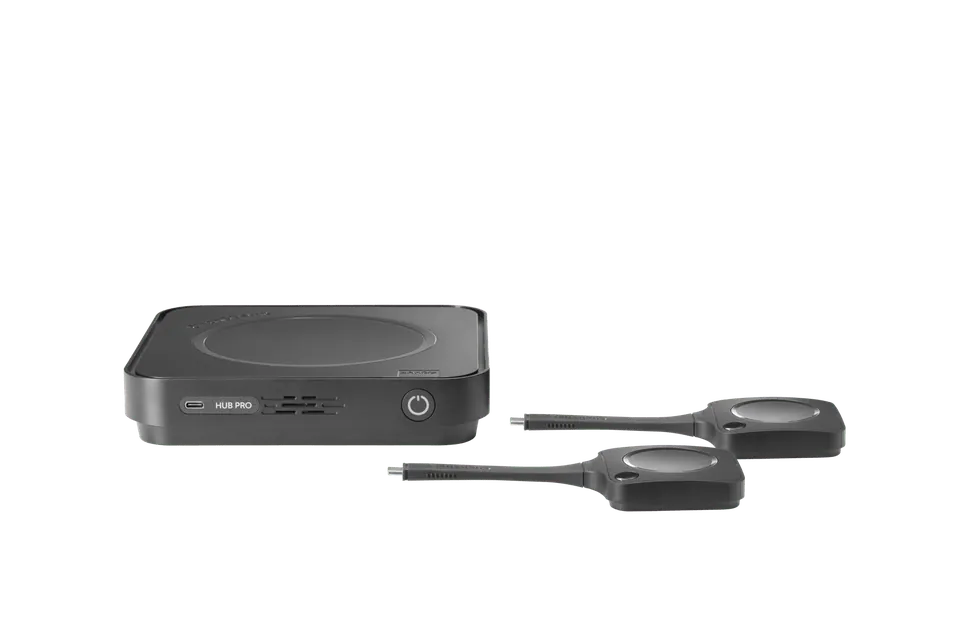
Photo: Barco.
Sources
Project Context
Ready to Apply This in Your Space?
A final engineering solution requires an assessment of your space, intended use and existing infrastructure.
Request a Consultation