AV Control
Crestron 1 Beyond i12 — A Camera That Also Has to Choose the Frame
A review of Crestron 1 Beyond i12: 12× optical zoom, Group Framing, Presenter Tracking, USB and HDMI/SDI modes, Intelligent Switching and differences in NDI documentation.
The lecturer walks to the board, returns to the desk and continues speaking from the other side of the room. Showing this movement to remote participants is not straightforward: the face looks small in a wide shot, while a person can easily walk out of a close-up. In these situations, camera automation can make a meeting significantly easier to watch.
Crestron IV-CAM-I12-B, also known as 1 Beyond i12, focuses on this task. It is a PTZ camera with 12× optical zoom that can automatically frame a group and visually track a presenter. The relevant intelligent processing takes place inside the camera, so these functions do not require an external computer running continuously.
*This review is based on Crestron's official documentation. No hands-on camera testing has been conducted; assessments of image quality and automation are an analysis of published capabilities.*
The i12 design uses two cameras. A wide-angle reference camera observes the space, while the moving PTZ camera composes the required shot. The logic is understandable: when switching to a close-up, the system retains a wider view of the room. Visual information from the reference camera is used to control the main camera.
Group Framing brings several participants into a shared frame. Presenter Tracking follows a person moving within a defined presentation zone. These functions are particularly valuable in teaching spaces, where a lecturer rarely stays in one place and a dedicated camera operator is not always available.
Automatic shot selection based on who is speaking requires additional architecture. The i12 is compatible with Automate VX, which uses information from microphones to identify the active speaker. When planning automatic switching between people at a table, the audio system therefore needs to be selected alongside the camera. The label AI alone does not fully define this workflow.
Optical zoom is an important advantage of this model. For a close-up of someone farther away, it offers an approach less dependent on digitally cropping the image. However, 12× zoom does not mean unlimited automatic tracking distance. The specification table gives a recommended Presenter Tracking range of 15–25 feet, approximately 4.6–7.6 meters. Check this distance before placing the camera on the rear wall of a large auditorium.
Placement has another boundary: the specified horizontal field of view of the main PTZ camera is 67.68°. In a short but wide room, obtaining a sufficiently wide shot may be the main difficulty. I would therefore begin camera selection with room dimensions and the geometry of the desired frame — how close we can zoom is only part of the task.
The key detail in video formats is that different outputs have different capabilities. According to the official specifications:
| Output | Maximum specified mode |
|---|---|
| 3G-SDI | 1080p60 |
| HDMI | 1080p60 |
| USB | 1080p30 |
For video conferencing, 1080p30 is sufficient in many cases. For recording motion at a higher frame rate, the connection path becomes important. Having a USB port does not provide all the camera's video capabilities. The camera's maximum resolution is Full HD; a requirement for 4K recording should be identified during selection.
Lighting also needs proper attention. A 1/2.8-inch Sony CMOS sensor and a minimum illumination figure of 2 lux are specified. However, minimum illumination alone cannot tell us about natural skin color, clean motion or actual noise levels. In my assessment, the demonstration should use the same lighting conditions as everyday room operation — with the presentation running and daylight entering through the windows.
The Tracking Zone is particularly important when configuring automation. The manual recommends including the presenter's movement area and excluding the first audience row where possible. The camera detects faces in this zone and observes the presenter. This indicates how important the actual room is during initial configuration.
Blocking Zones provide an additional way to limit the influence of displays, windows or unwanted participants. But an excessively large blocked zone may also prevent detection of the presenter. I would use this tool to resolve a specific problem: for example, reducing unwanted shot changes caused by someone passing through a doorway or a face shown on a display.
Working with several cameras is another interesting capability. The current manual describes Visual Cue Intelligent Switching with one primary i12 camera and up to four additional intelligent cameras. When someone enters a predefined zone, the system switches to the relevant view. This may be useful in a room where different cameras serve a shared table and a presentation area.
This function has a specific limitation: the cameras must be on the same network, while the primary camera connects to the conferencing device through USB with MJPEG support. Built-in Intelligent Switching does not work on HDMI and SDI outputs. A USB conferencing system and a broadcast setup built around an SDI video mixer therefore require different design approaches.
There is also a discrepancy in the network video documentation. The current product page lists NDI|HX2, while the Automate VX camera comparison table marks NDI output as unavailable for the i12. These sources do not establish the reason for the difference. For an NDI-based project, I would obtain written clarification of the specific model and firmware capabilities before purchasing.
PoE simplifies installation, while Microsoft Teams Rooms and Zoom Rooms certification is useful for use in the corresponding conferencing systems. Package contents also matter: mounting accessories are sold separately, as is the specified external power supply if PoE is not used. The final budget should include commissioning as well as the camera price.
In my assessment, the i12 is most convincing in medium-sized teaching and meeting spaces where automatically changing the shot to follow a lecturer's movement or a group's arrangement offers real value. Long distances, 4K recording or a requirement for built-in automatic switching over HDMI/SDI are reasons to look for other capabilities.
During a demonstration, I would check several simple but important scenarios: rapid presenter movement, leaving and returning to the zone, a second person entering and moving video on a display. The value of this camera becomes apparent in these moments — how understandable and calm is the visual experience for the person watching the meeting on screen?
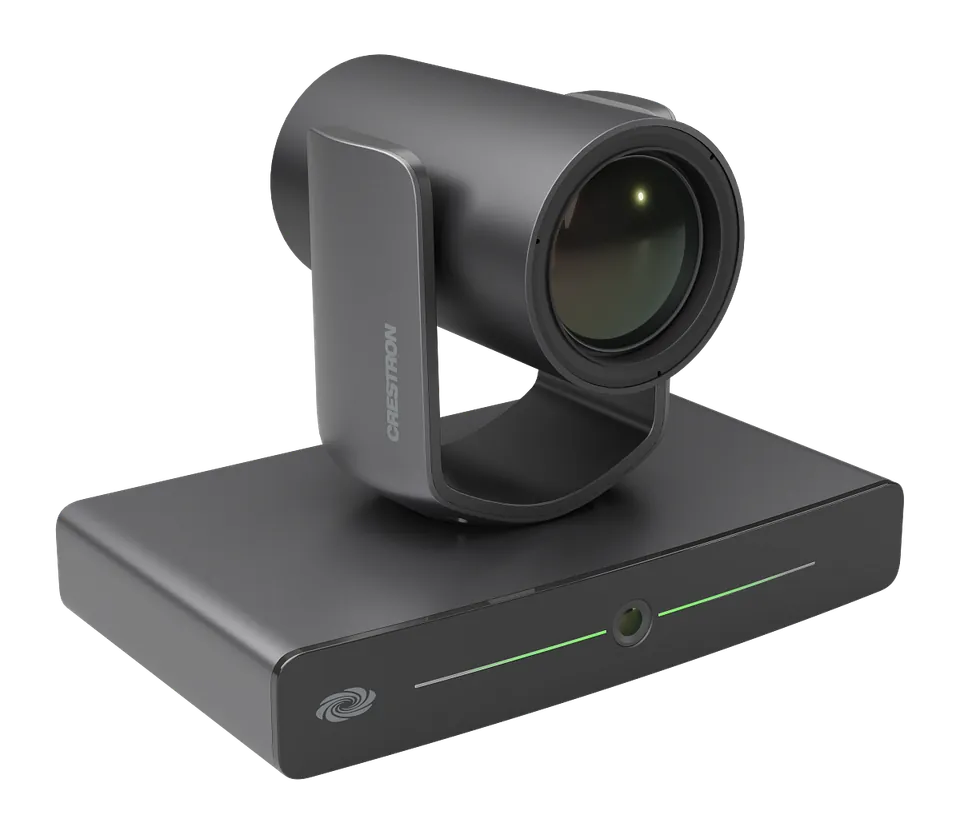
Photo: Crestron.
Sources
Project Context
Ready to Apply This in Your Space?
A final engineering solution requires an assessment of your space, intended use and existing infrastructure.
Request a Consultation