AV Control
Shure IntelliMix Bar Pro Kit — Bringing the Entire Meeting Room into One System
A review of the Shure IMXBPK-B: four 4K cameras, IntelliMix audio processing, Teams Rooms, participant framing limitations and scenarios to test in a real room.
A person at the far end of a long conference table begins speaking. Their voice is understandable in the room, but remote participants lose words and see only a small face in the wide shot. A video bar mounted by the display has to solve both problems at once. In medium and large rooms, that is already an ambitious task.
Shure IntelliMix Bar Pro Kit, model IMXBPK-B, combines cameras, microphones, loudspeakers, audio processing and an integrated conferencing computer. The kit also includes a touch control panel. Designed for Microsoft Teams Rooms, the system aims to reduce the number of devices around the display.
*This review is based on manufacturer documentation. No hands-on testing has been performed; usability assessments are an analysis of technical capabilities.*
What interests me most is how audio and video work together. Audio processing is familiar territory for Shure, but camera behavior also defines the meeting experience: how quickly it finds a speaker, how naturally it changes views, and how calmly it holds a shot when no change is needed.
The video system uses four 4K cameras. Shure specifies a combined 135-degree field of view, while IntelliMix View provides automatic participant framing and highlights the active speaker. The combination of wide-angle and telephoto optics is an interesting foundation for capturing people seated in different positions.
However, having four cameras does not mean every participant always gets an individual frame. According to the official manual, Participant Tiling arranges images of up to four participants into separate tiles. With more people, the system switches to Room Framing, a shared view. Follow Talker tracks the last four active speakers. This is one of the most important details when selecting a system for a large table.
I would therefore not finish a demonstration with only four people in the room. I would bring in as many participants as normally attend real meetings. Changes in framing with five or more people, and correctly separating speakers sitting next to each other, would be especially interesting to test.
The cameras are specified for up to 4K resolution at 30 frames per second. This provides useful detail for framing, but the conferencing platform and network also determine the video received remotely. A camera specification alone cannot establish final call quality. I would pay particular attention to facial detail at the far end of the table, especially in automatically generated close-ups.
The audio processing list is substantial: automatic mixing, acoustic echo cancellation, noise reduction, automatic gain control, compression and equalization. These functions have a concrete purpose: making speech leaving the room consistent and intelligible for remote listeners.
But processing effectiveness needs to be demonstrated in difficult scenarios. For example, two people in the room may speak simultaneously while a remote participant interrupts. Overly aggressive noise reduction can affect speech naturalness, while automatic gain increases may make background noise more noticeable. These are potential trade-offs that require actual listening.
The current version of the manual specifies microphone pickup of 8.5 meters under typical conditions. That is a useful starting point, but it does not describe the room's acoustics. Glass walls, high reverberation, ventilation noise and the direction a speaker faces all affect results. Quiet speech from the farthest chair is a more convincing test than a few loud sentences close to the device.
Shure also presents this product in the context of AI tools and accurate transcription. The connection is logical: better speech capture helps automatic transcription. However, transcription and meeting summaries also depend on the relevant software service. For Georgian-language meetings, language support and actual recognition accuracy must be checked separately. Audio hardware quality alone cannot validate the entire chain.
The integrated stereo loudspeakers serve everyday conferencing needs. Their specified frequency response starts at 120 Hz at the −10 dB limit. This limitation matters for convincing reproduction of music and low frequencies. An analog stereo output is also provided for connecting an external amplifier or powered loudspeakers.
Among the connections, I would read the USB-C description particularly carefully. The manual describes the relevant USB-C/DisplayPort connection as content ingest. That does not establish that a guest laptop will automatically gain access to the room's camera, microphones and loudspeakers through one cable for any conferencing application. If guest-laptop operation is essential, that scenario must be confirmed and tested separately.
The system uses the Android-based Microsoft Device Ecosystem Platform. For IT teams, its value lies in consistent operation across rooms and centralized support. ShureCloud and compatible management platforms provide monitoring, updates and remote troubleshooting. Across several offices, this is an important part of everyday support.
The supplied equipment is practical: a 10-inch panel, wall mount, power supply, essential cables and camera covers are included. However, commissioning also requires preparing the room account and network; the manual also requires an appropriate Teams Rooms license. The final budget should include that work.
The price makes this a substantial conferencing investment. Shure's European page lists a recommended retail price of €5,659 for the kit. At this level, I would compare more than device specifications: installation, configuration, support and any additional peripherals all contribute to total cost.
In my assessment, IntelliMix Bar Pro Kit is particularly interesting for an organization that uses Teams Rooms daily and plans a consistent experience across several medium or large rooms. For an unusually shaped, very long or acoustically difficult space, I would verify its capabilities in the actual room.
An acceptance test would combine a fully occupied table, normal speech, running ventilation and a remote participant joining the discussion. If people can hear and see each other effortlessly under those conditions, the all-in-one bar is fulfilling its central purpose.
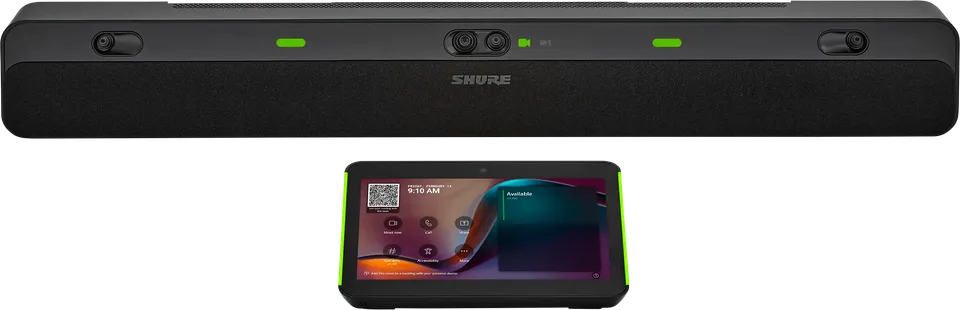
Photo and official product page: Shure.
Sources
Project Context
Ready to Apply This in Your Space?
A final engineering solution requires an assessment of your space, intended use and existing infrastructure.
Request a Consultation